Bose Lifestyle 18 / 28 / 38 / 48 / V20 / V30 / V40
This document describes how MyURemote integrates with older Bose Lifestyle systems released roughly between 2002 and 2010. These systems use a classic RS232 serial interface with a control and feedback model that differs from both earlier TTL-based systems and later (2011+) Bose generations. This approach aligns with Bose’s own third-party control guidance for installers (reference).
1. Introduction
MyURemote provides stable control and live feedback for this generation of Bose Lifestyle systems, including source selection, volume control and multiroom operation.
These systems are often referred to as the “classic RS232 Bose Lifestyle generation”. They do not use TTL (like Lifestyle 40/50), and they do not use the newer serial protocol found in 2011+ systems.
2. Supported models
- Lifestyle 18
- Lifestyle 28
- Lifestyle 38
- Lifestyle 48
- Lifestyle V20
- Lifestyle V30
- Lifestyle V40
Important: These models must be equipped with a console that has a physical RS232 serial connector.
3. Not compatible hardware (very important)
Some Bose consoles look similar but are not compatible with MyURemote because they do not provide a usable serial control interface.
-
AV28 console – not compatible
- The AV28 does not have a usable RS232 control port.
- This is clearly printed on the bottom of the console as “AV28”.
- MyURemote cannot control AV28-based systems.
When in doubt, check the label on the underside of your Bose console or send a photo to MyURemote support before purchasing hardware.
4. Control method
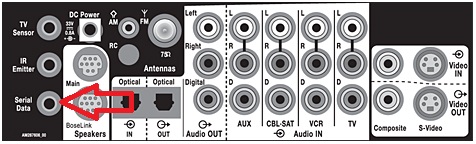
Control is performed via RS232 serial communication using a network-based serial controller.
MyURemote sends commands to the Bose console and receives live feedback such as:
- Volume level
- Power state
- Selected source
- Zone and room status
5. What you need
Required hardware
- Network serial controller:
- Global Caché IP2SL (recommended)
- Global Caché GC100
- Global Caché Flex (with serial adapter)
- Correct RS232 cable for the Bose Lifestyle serial port
Note: No RS232-to-TTL converter is required for this generation. These systems use native RS232 signaling.

6. Global Caché controller settings (important)
Incorrect serial settings are the most common cause of communication issues or missing feedback.
- Serial mode: RS232
- Baud rate: 19200
- Data bits: 8
- Parity: None
- Stop bits: 1
- Flow control: None
Always verify these settings via the Global Caché web interface before troubleshooting wiring or software configuration.
7. How it works
- MyURemote sends a command over the network.
- The Global Caché controller outputs RS232 to the Bose console.
- The Bose system executes the command.
- Status and feedback are returned to MyURemote.
8. Troubleshooting tips
- Verify the console is not an AV28.
- Check RS232 cable wiring and pinout (see wiring diagram above).
- Confirm Global Caché baud rate is 19200.
- Ensure the correct Bose model type is selected in MyURemote.
- If unsure, take a photo of the setup and contact support.