Bose Lifestyle 40 / 50 (M1 Multi-Room Interface, TTL)
This guide explains how to control Bose Lifestyle 40/50 systems via the M1 Multi-Room Interface (TunerOne) using a TTL-based serial data interface. Wiring and hardware for Lifestyle 40/50 is fundamentally different from other Bose families.
1. Introduction
MyURemote can replace the original Lifestyle 40/50 remote and provide a modern, uniform interface with multiroom support. Control is achieved via a network serial controller and a TTL conversion chain to the M1 Multi-Room Interface serial data port.
Because this is a TTL-based interface, correct wiring is essential. Small differences in adapters, pinouts and grounding can make the difference between “no comms” and a stable setup.

2. Supported models
- Bose Lifestyle 40
- Bose Lifestyle 50
- M1 Multi-Room Interface (TunerOne) required for the serial data port
Not supported: Bose Lifestyle 8 (Series II) — RF remote only, no RS232 or IP interface.
3. Control method
Control path (high level):
- MyURemote sends commands over the network to a serial controller (e.g. Global Caché).
- The controller outputs RS232.
- An RS232 → TTL converter translates the signal to TTL level.
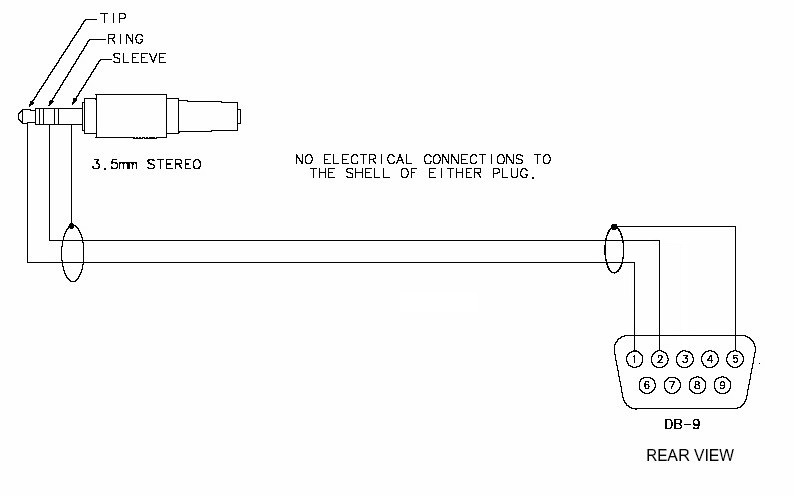
- A custom mini-jack cable connects TTL TX/RX to the M1 serial data port.
Feedback depends on correct serial communication and the selected configuration.
4. What you need
Required hardware
- Network serial controller (examples):
- Global Caché IP2SL
- Global Caché GC100
- Global Caché Flex (with the correct serial accessory)
- RS232 → TTL converter (5V TTL)
- Custom cable from TTL side to the M1 mini-jack serial data port
Notes
- The cable to the M1 mini-jack is not a standard cable. You will build or adapt it.
- If using GC Flex: the Flex Link Serial cable is only required for Flex, not for IP2SL / GC100.
Community notes (real-world setups)
Alternative RS232→TTL converter (StarTech discontinued)
Users reported that the StarTech IC232TTL is discontinued. A working alternative used successfully: SerialComm RS232 to 5V TTL Converter (TTL-232-5P).
Ground/earth can block communication
At least one successful setup required disconnecting ground and using only TX/RX. If you get no communication, try TX/RX only first, then add ground only if needed.
TX/RX swap is a common fix
Several users fixed “no comms” by swapping the two signal wires (TX/RX). If nothing works and your hardware is correct, swap the two signal lines and retry.
Power down before connecting
Recommendation from users: power down both the controller and the M1 interface before plugging/unplugging the custom cable.
Bonus: PMC may come back to life
Reported: after restoring M1 communication and setting up zones, Personal Music Centres (PMC) started working again without reconnecting.